Codec
What Is Codec And The Term
Codec is a video compress format created by apple computer to enable playback of RGB video in real time, it can perform loseless or lossy compression, supports colour depth 1-32 bits and is one of the very few video codecs that support an aplha channel. A Codec is how you want to e.g. save a piece of work
15 Body Assets
Above is my character that i created using the skeleton body that i had downloaded, the 15 assets i have for this character include: Left Foot, Right Foot, Lower Left Leg, Lower Right Leg, Upper Left Leg, Upper Right Leg, Pelvis, Body, Left Upper Arm, Left Bottom Arm, Right Upper Arm, Right Bottom Arm, Left Hand, Right Hand and Head.
Character And Background
Above is my character and my background that i created myself, here i have 5 different assets, FG1, FG2, MG, BG1, BG2, my Fore Ground 1 consists of my character, my Fore Ground 2 consists of the flooring, my Mid Ground consists of my first building, my lamposts, my food stand and my second building, my Back Ground 1 consist of my clouds, my church on the hills and the mountains and my Back Ground 2 is my blue background and sun that doesnt move
3 Different Backgrounds
Mind Map
Walk And Run Cycle
Character And Background Layers
Skeleton Rig
This is my Skeleton Rig that we downloaded the Photoshop image with all the different layers then we rigged them layers in After Effects to create movement and we did that by working on each individual layer and selecting the right points.
Keyframe Of Character Moving Up And Down
Every 0.25 within a second i created a keyframe of my character going up then at 0.50 he reaches the top point, then 0.75 he goes down between where he started from then at 1.0 he goes back to where he fully started again, so i repeated this and it makes the character illustrate movement when it goes across my screen.
Sound Syncronising
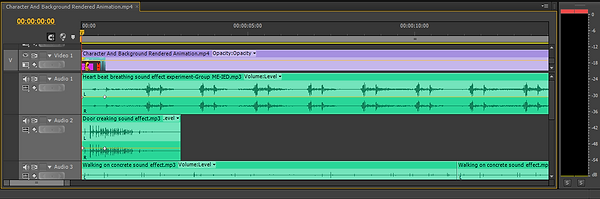
Here i imported my video and sound effects that i will be using through my video and placed them in the correct location to work properly with my video, i then grabbed a hold of the yellow lines and pulled them down or up to adjust the volume of each sound effect over the rest of the sound effects and then at the beginning or end of some of them i pulled the side bits down to make some of them fade in or out.
2D Animation Video With Sound
This is my 2D animation video that i have created with sound using Photoshop, After Effects and Premier Pro. I create the seperate layers for my character and for my background and used multiple tools and colours to give it the effects that you see in the video, i used After Effects to get my character to move up and down and to get the different layers of the background to move at different times also i used Premier Pro to put the sound into it.
Inverse Keynomatic (IK) Rigging Position Keyframe
Below shows the seperate keyframes for which links each individual keyframe up to each other, this allows when played the character to be able to move with his hands, feet or head.
Inverse Keynomatic (IK) Rigging Rotation Keyframe
Below shows the seperate keyframes for which links each individual keyframe up to each other, this allows when played the character to have e.g. his hands or feet rotate instead of staying stiff when his arms and legs move.
2D Animation Walk/Run Cycle
This is my 2D animation video that i have created using Photoshop and After Effects. I created the seperate layers for my character and then using the Duix Tool to add a controller to both the hands and feet and also the head, i then used the IK (Inverse Keynomatic) tool to link the layers up to give me control of the controller to be able to move the parts about.




Here are my five diffrerent Layers that i will be using within my animation, the character i created will be on Foreground One (FG1), the ground my character will be walking across will be on Foreground Two (FG2), my Midground (MG) will be the street my character walks upon, my Background One (BG1) will be the scenario in the background, my Background Two (BG2) will be the sun and the gradient that i have used within my animation. I thought about Three different background and this is the one i chosen, i then scanned it onto the computer and started working on it and the same with my character.


Here Is A List Of The Sounds I Used For The Video On The Left Hand Side That I Downloaded From Youtube:
Door Creaking Sound Effect
https://www.youtube.com/watch?v=Lg3EDyVu2aY
Good Ending Theme Extended Sound Effect
https://www.youtube.com/watch?v=IHRM5A6bXFQ
Heart Beat Breathing Sound Effect
https://www.youtube.com/watch?v=ZazkpJR0qH0
Scary Bell Sound Effect
https://www.youtube.com/watch?v=8SYgxLRTASQ
Seagull Sound Effect
https://www.youtube.com/watch?v=xolWjKkf244
Walking On Concrete Sound Effect
https://www.youtube.com/watch?v=xolWjKkf244
Wind Cold Scary Sound Effect
On the left hand side are three different sketches for background ideas, the top background is what i have chosen to go with but the other two i have decided not to make them the main background for the animation.
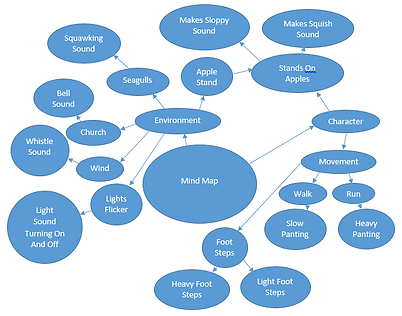
On the left hand side is my Mind map of my ideas for what i could do with my character and chosen background, these are all the different ideas that i had currently at the time. The reason i did this mind map was to help me get an idea of what i could do with my character in background 1, doing this helped me choose that i was having him walking but instead of slow panting i chosen heavy panting as it makes my character more developed of being scary or to fit a horror genre, i didnt actually get my character to make it to the apple stand so anything involving the apples was taken out of the animations, i had involved birds around the church that squawked as my character got closer to the church as well as the sound of the bell going of for the church, throughout the video i has the sound of a whistle sound in the wind for the fact that it made it looked or sound like an abandoned city and i didnt get around to having the lights flicker as well as the sound for them turning on and off.
Here is my walk cycle that i drew up in my sketch book, before i did this i went out and recorded myself walking and then stopping using a digital camera on a stand.
Here is my run cycle that i drew up in my sketch book, before i did this i went out and recorded myself running and then stopping using a digital camera on a stand.
Background 2
Here is my background 2 that i have created using Photoshop but it isnt in full motion as i didnt choose this to be my main background to work on.

Background 3
Here is my background 3 that i have created using Photoshop but it isnt in full motion as i didnt choose this to be my main background to work on.

Comparing All Three Backgrounds
I have created three backgrounds using the software Photoshop and multiple tools, the reason why i chosen background one is for the fact that i thought i could benefit more from it as in, i believed i could add more sound to background 1 then i could to the others.
Feedback Of Work Done So Far
Please Enter Name Below And Your Feedback As Shown Below:
Jonathan Berry
:(Enter Feedback Here)
C Johnson 23/04
2D Animation with sound- I liked the sounds of the seagulls, the parallax effect youve done on the background and the gradient on the sky.
Why can you hear his heart beat.
Your characters head does not move nor does his arms, i think if you animated those aswell you would have a really awesome animtion.
2D Animation walk/run cyle-
I really like the way you IK rigged this, the head moves along with the torso and it looks really good.
Why did you use that background colour.
Altough the animation is good, it does not look like your character is running/walking, i think if you looked at some walked cyles and followed the way someone walks and translated that into your animation it would be really good.
Thankyou Courtney for your feedback, to answer youur question of "Why can you hear his heart beat" is for the fact he is a monster character that i have created thats main purpose is to go around and kill people but ive added it to give it more of a scary unreal feeling so you could imagine him creeping up but hearing his heart beat loudly first. i am aware that the characters arms and head does not move but i am thinking of re-making it in the future to make it more realistic for when he is walking across the background.
I reason i chosen that background colour was so it matches the colour of my character thats why i made it more feint on the inside of it so you can actually see the character. I am aware it doesnt look like my character is walking or running it looks more like he is skipping because his legs are too much parted for when he lifts the other leg, but i will have a look at other peoples work next time and apply it to my character, the reason it looks how it looks is because of the lack of time i had been given to create it.
C Kuta 23/04
Your first animation has a really nice scrolling parallax animation for the background, and your second piece has nice smooth movement in the animation of your character movements.
How did you achieve the smooth movements of your character in the second animation?
It would be nice to see the scrolling background from your 1st animation mixed with your character movement from the 2nd, would you do this in the future?
Thankyou Chris for your feedback, and thankyou for your compliment towards the scrolling parallax animation for my background, to answer your question of "How did you achieve the smooth movements of your character in the second animation" is because i IK Rigged my character so that on each keyframe each part of him moved at the same but i am aware that some parts move faster than others, to answer your other question, yes i would include my background onto my animation but unfortunatly i had ran out of time to apply this to the piece of work, but i do believe it would of improved the appearence of the animation.